Download the file as described below.
STEP ONE:
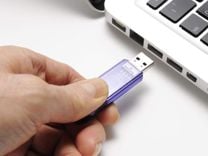
Take the flash card with one or two hands and insert it into the USB port of your computer.
Remove previously downloaded system updates from the usb device.
STEP TWO:
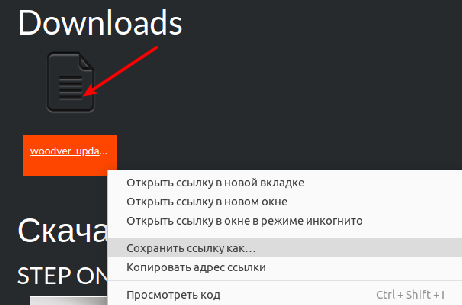
Right-click on the link or on the update file itself and select Save object as...
If necessary, select a folder and click Save.
Remember exactly where you saved the update file.
By default, the browser will save files to the folders listed below.
Windows: /Users/ user_name /Downloads.
Mac: /Users/ user_name /Downloads.
Linux: /home/ user_name /Downloads.
STEP THREE:
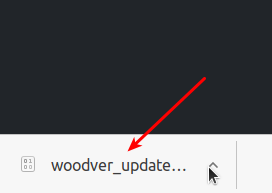
When the download is complete, you will see the file at the bottom of the browser window.
Next to the file name, click on the down arrow(Chrome browser).
or right - click on the file name at the bottom of the screen.
STEP FOUR:
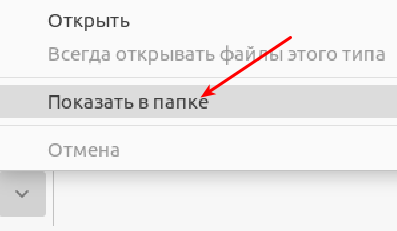
Click the down arrow next to the file name..
Then, in the menu, click "Show in folder"..
Go to the update downloads folder.
STEP FIVE:
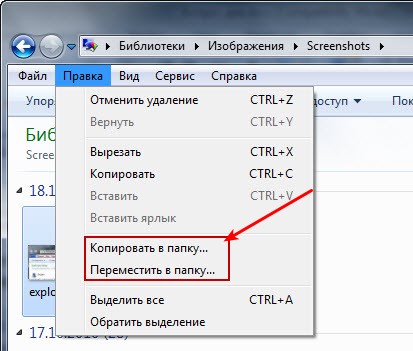
Right-click on the downloaded file
In the menu that opens, click " Copy ..."
Next, select the flash card folder.
Press "Select" or "Оk".
STEP SIX:

Wait for the file copying process to complete
Open the list of USB files in the explorer.
and make sure that the name of the recorded file corresponds to:
woodver_update_sgnopti
The name should not contain any other characters: numbers, brackets, and so on .
Otherwise rename the file.
Remove the flash card from the computer port
STEP SEVEN:

Make sure that the motors of your saw complex are turned off and
the carriage is in the extreme position
Insert the flash card into the USB port of the saw complex control panel
STEP EIGHT:
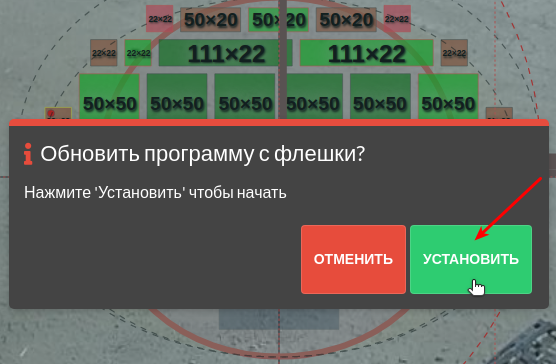
Within 30 seconds, a notification will appear on the screen that an update is available. Click " Install".
The update will start automatically and may take several minutes.
Do not turn off your computer during the update process
STEP TEN: